반응형

문제

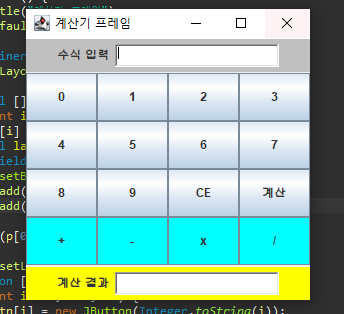
다음과 같은 GUI 모양을 가진 스윙 프레임을 작성하라. Open Challenge의 힌트나 정답을 참고하라. 버튼은 JButton, 텍스트 JLabel, 입력창은 JTextField를 사용하면 된다.


소스 코드

import javax.swing.*;
import java.awt.*;
public class Main7 extends JFrame{
	public Main7() {
		setTitle("계산기 프레임");
		setDefaultCloseOperation(JFrame.EXIT_ON_CLOSE);
		
		Container c = getContentPane();
		c.setLayout(new BorderLayout());
		
		JPanel [] p = new JPanel[3];
		for(int i = 0;i<3;i++)
			p[i] = new JPanel();
		JLabel label = new JLabel("수식 입력");
		TextField tf = new TextField(20);
		p[0].setBackground(Color.LIGHT_GRAY);
		p[0].add(label);
		p[0].add(tf);
		
		c.add(p[0],BorderLayout.NORTH);
		
		p[1].setLayout(new GridLayout(4,4));
		JButton [] btn = new JButton[16];
		for(int i = 0;i<10;i++) {
			btn[i] = new JButton(Integer.toString(i));
			p[1].add(btn[i]);
		}
		btn[10] = new JButton("CE");
		btn[11] = new JButton("계산");
		btn[12] = new JButton("+");
		btn[13]	= new JButton("-");
		btn[14] = new JButton("x");
		btn[15] = new JButton("/");
		for(int i = 10;i<16;i++)
		{
			if(i > 11)
				btn[i].setBackground(Color.CYAN);
			p[1].add(btn[i]);
		}
		
		c.add(p[1],BorderLayout.CENTER);
		
		JLabel label2 = new JLabel("계산 결과");
		TextField tf2 = new TextField(20);
		p[2].setBackground(Color.yellow);
		
		p[2].add(label2);
		p[2].add(tf2);
		
		c.add(p[2],BorderLayout.SOUTH);
		
		setSize(300,300);
		setVisible(true);
	}
	public static void main(String[] args) {
		new Main7();
	}

}

반응형
반응형

문제

20개의 10 x 10 크기의 JLabel 컴포넌트가 프레임 내에 (50, 50) 위치에서 (250, 250) 영역에서 랜덤한 위치에 출력되도록 스윙 프로그램을 작성하라. 프레임의 크기를 300 X 300으로 하고, JLabel의 배경색은 모두 파란색으로 하라.


소스 코드

import javax.swing.*;
import java.awt.*;

public class Main6 extends JFrame{
	public Main6() {
		setTitle("Random Labels");
		setDefaultCloseOperation(JFrame.EXIT_ON_CLOSE);
		
		Container c = getContentPane();
		
		c.setLayout(null);
		JLabel [] label = new JLabel[20];
		
		for(int i = 0;i<20;i++) {
			label[i] = new JLabel();
			label[i].setBackground(Color.BLUE);
			int x = (int)(Math.random()*200)+50;
			int y = (int)(Math.random()*200)+50;
			label[i].setLocation(x, y);
			label[i].setSize(10,10);
			label[i].setOpaque(true);
			c.add(label[i]);
		}
		setSize(300,300);
		setVisible(true);
	}
	
	public static void main(String[] args)
	{
		new Main6();
	}
}

반응형
반응형

문제

GridLayout을 이용하여 다음 그림과 같이 Color.WHITE, Color.GRAY, Color.RED 등 16개의 색을 배경색으로 하는 4 x 4 바둑판을 구성하라.


소스 코드

import javax.swing.*;
import java.awt.*;

public class Main5 extends JFrame{
	Color[] color = { Color.red, Color.ORANGE, Color.yellow, Color.green,
			Color.cyan, Color.blue, Color.magenta, Color.DARK_GRAY, Color.pink,
			Color.LIGHT_GRAY, Color.white, Color.black, Color.black, Color.orange,
			Color.blue, Color.magenta
	};
	public Main5() {
		setTitle("4x4 Color Frame");
		setDefaultCloseOperation(JFrame.EXIT_ON_CLOSE);
		
		Container c = getContentPane();

		c.setLayout(new GridLayout(4,4));
		JLabel [] jlb = new JLabel[16];
		
		for(int i = 0;i<16;i++) {
			jlb[i] = new JLabel(Integer.toString(i));
			jlb[i].setOpaque(true);
			jlb[i].setBackground(color[i]);
			c.add(jlb[i]);
		}
		
		setSize(500,200);
		setVisible(true);
	}
	public static void main(String[] args) {
		// TODO Auto-generated method stub
		new Main5();
	}

}

색깔이 맞는지는 모르겠네요..ㅎ

반응형
반응형

문제

문제 3을 수정하여 다음 결과와 같이 각 버튼의 배경색을 서로 다르게 설정하라.


소스 코드

import javax.swing.*;
import java.awt.*;

public class Main4 extends JFrame{
	Color [] color = { Color.RED, Color.ORANGE, Color.YELLOW, 
			Color.GREEN, Color.CYAN, Color.BLUE, Color.MAGENTA, Color.GRAY, 
			Color.PINK, Color.LIGHT_GRAY };
	public Main4(){
		setTitle("Ten Color buttons Frame");
		setDefaultCloseOperation(JFrame.EXIT_ON_CLOSE);
		
		Container c = getContentPane();
		
		c.setLayout(new GridLayout(1,10));
		
		JButton btn[] = new JButton[10];
		
		for(int i = 0;i<10;i++)
		{
			btn[i] = new JButton(Integer.toString(i));
			btn[i].setBackground(color[i]);
			c.add(btn[i]);
		}
		
		setSize(500,200);
		setVisible(true);
	}
	public static void main(String[] args) {
		// TODO Auto-generated method stub
		new Main4();
	}

}

반응형
반응형

문제

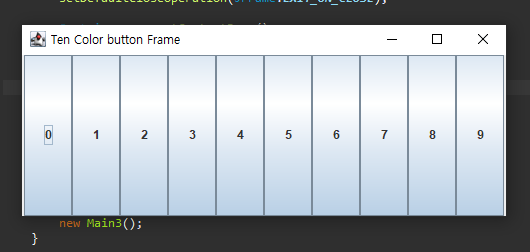
GridLayout을 사용하여 다음 그림과 같이 한 줄에 10개의 버튼을 동일한 크기로 배치하는 스윙 프로그램을 작성하라.


소스 코드

import javax.swing.*;
import java.awt.*;

public class Main3 extends JFrame{
	public Main3() {
		setTitle("Ten Color button Frame");
		setDefaultCloseOperation(JFrame.EXIT_ON_CLOSE);
		
		Container c = getContentPane();
		c.setLayout(new GridLayout(1,10));
		JButton btn[] = new JButton[10];
		for(int i = 0;i<10;i++)
		{
			btn[i] = new JButton(Integer.toString(i));
			c.add(btn[i]);
		}
		
		setSize(500,200);
		setVisible(true);
	}
	public static void main(String[] args) {
		new Main3();
	}

}


반응형
반응형

문제

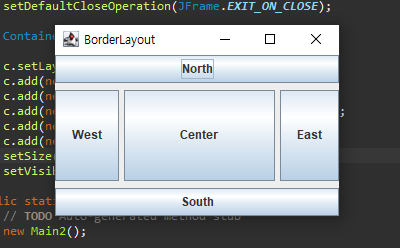
BorderLayout을 사용하여 컴포넌트 사이의 수평 수직 간격이 각가 5픽셀, 7픽셀이 되도록 스윙 응용프로그램을 작성하라.


소스 코드

import java.awt.*;
import javax.swing.*;
public class Main2 extends JFrame{
	public Main2(){
		setTitle("BorderLayout");
		setDefaultCloseOperation(JFrame.EXIT_ON_CLOSE);
		
		Container c = getContentPane();
		
		c.setLayout(new BorderLayout(5,7));
		c.add(new JButton("North"),BorderLayout.NORTH);
		c.add(new JButton("West"),BorderLayout.WEST);
		c.add(new JButton("Center"),BorderLayout.CENTER);
		c.add(new JButton("East"),BorderLayout.EAST);
		c.add(new JButton("South"),BorderLayout.SOUTH);
		setSize(300,200);
		setVisible(true);
	}
	public static void main(String[] args) {
		// TODO Auto-generated method stub
		new Main2();
	}

}


반응형
반응형

문제

다음 그림과 같이 "Let's study Java"라는 문자열을 타이틀로 가지고 프레임의 크기가 400x200인 스윙 프로그램을 작성하라.


소스 코드

import javax.swing.*;

public class Main1  extends JFrame{
	public Main1() {
		setTitle("Let's study Java");
		setDefaultCloseOperation(JFrame.EXIT_ON_CLOSE);
		setSize(400,200);
		setVisible(true);

		}
	
	public static void main(String[] args) {
		new Main1();
	}

}


반응형
반응형

문제

Open Challenge를 수정하여 사용자가 단어를 삽입할 수 있도록 기능을 추가하라.


출력 예시

**** 영어 단어 테스트 프로그램 "명품영어" 입니다. ****
단어 테스트:1, 단어 삽입:2, 종료:3 >> 1
현재 17개의 단어가 들어 있습니다. -1을 입력하면 테스틑 종료합니다.
eye?
(1)눈 (2)동물 (3)사랑 (4)감정 :>1
Excellent !!
human?
(1)인간 (2)감정 (3)거래 (4)그림 :> 2
No. !!
fault?
(1)오류 (2)감정 (3)사회 (4)조각상 :> 1
Excellent !!
emotion?
(1)그림 (2)사랑 (3)거래 (4)감정 :> ㅁ러미  -잘못입력한경우
숫자를 입력하세요 !!
painting?
(1)거래 (2)눈 (3)애인 (4)그림 :> 4
Excellent !!
animal?
(1)사회 (2)그림 (3)동물 (4)눈 :> -1  -단어 테스트 종료

단어 테스트:1, 단어 삽입:2, 종료:3 >> 2
영어 단어에 그만을 입력하면 입력을 종료합니다.
영어 한글 입력 >> flag 깃발
영어 한글 입력 >>  friend 친구
영어 한글 입력 >>  computer 컴퓨터
영어 한글 입력 >>  imagine 상상
영어 한글 입력 >>  smile 웃음
영어 한글 입력 >>  그만

단어 테스트:1, 단어 삽입:2, 종료:3 >> 1
smile?
(1)상상 (2)사회 (3)웃음 (4)주식 :> 3
Excellent !!
freind?
(1)오류 (2)친구 (3)자기 (4)사진 :> 2
Excellent !!
dall?
(1)컴퓨터 (2)인형 (3)상상 (4) 사랑 :> -1

단어 테스트:1, 단어 삽입:2, 종료:3 >> 3
"명품영어"를 종료합니다.


소스 코드

import java.util.*;

class WordTest {
	HashMap<String,String> HM = new HashMap<String,String>();
	ArrayList<Boolean> Check = new ArrayList<Boolean>(); //문제를 냈는지 체크
	WordTest(){
		HM.put("love","사랑");
		HM.put("animal","동물");
		HM.put("emtion","감정");
		HM.put("human","인간");
		HM.put("stock","주식");
		HM.put("trade","거래");
		HM.put("society","사회");
		HM.put("baby","아기");
		HM.put("honey","애인");
		HM.put("dall","인형");
		HM.put("bear","곰");
		HM.put("picture","사진");
		HM.put("painting","그림");
		HM.put("fault","오류");
		HM.put("example","보기");
		HM.put("eye","눈");
		HM.put("statue","조각상");

		Scanner s = new Scanner(System.in);
		int Input;
		
		while(true) {
			System.out.println("**** 영어 단어 테스트 프로그램 \"명품영어\" 입니다. ****");
			System.out.print("단어 테스트: 1, 단어 삽입: 2, 종료: 3>>");
			Input  = s.nextInt();
			s.nextLine();
			switch(Input) {
			case 1:
				for(int i = 0;i<HM.size();i++)
					Check.add(false); //초기화
				System.out.println("현재 "+HM.size()+"개의 단어가 들어 있습니다. -1을 입력하면 테스트를 종료합니다");
				TestRun(s);
				System.out.println();
				break;
			case 2:
				System.out.println("영어 단어에 그만을 입력하면 입력을 종료합니다.");
				AddWord(s);
				System.out.println();
				break;
			case 3:
				System.out.println("\"명품영어\"를 종료합니다.");
				return;
			}
		}
	}
	private void TestRun(Scanner s) {
		Set<String> keys = HM.keySet();
		int TestTime = 0;
		while(true) {
			if(TestTime>=HM.size()) {
				System.out.println("모든 테스트를 진행하였습니다. 종료합니다.");
				return;
			}
			Iterator<String> it = keys.iterator();
			Iterator<String> it2 = keys.iterator();
			int size = HM.size()-1;
			int Random = (int)(Math.random()*size);
			String problem = "";
			if(Check.get(Random) != false)
				continue;
			int k = 0;
			while(it.hasNext()) {
				String temp=it.next();
				if(k == Random)
				{
					problem = temp;
				}
				k++;
			}
			TestTime++;
			System.out.println(TestTime + "번째 실행");
			System.out.println(problem);
			int order[] = new int[4];
			int random1,random2,random3;
			while(true) {
			random1 = (int)(Math.random()*size);
			random2 = (int)(Math.random()*size);
			random3 = (int)(Math.random()*size);
			if(random1 != random2 && random1 != random3 &&
					random1 != Random && random2 != random3 && 
					random2 != Random && random3 != Random)
				break;
			}
			
			order[0] = random1;
			order[1] = random2;
			order[2] = random3;
			order[3] = Random;
			
			Arrays.sort(order);
			int count = 0;
			for(int i =0;i<HM.size();i++)
			{
				String temp = it2.next();
				for(int j = 0;j<4;j++) {
					if(i == order[j])
						System.out.print("("+ ++count + ")" + HM.get(temp) + " ");
				}
			}
			System.out.print(" :> ");
			try {
			int Input = 0;
			Input = s.nextInt();
			if(Input == -1)
				break;
			else if(order[Input-1] == Random)
				System.out.println("Excellent !!");
			else
				System.out.println("NO. !!");
			}
			catch(InputMismatchException e) {
				System.out.println("숫자를 입력하세요 !!");
				s.nextLine();
				continue;
			}
		}
		
		
	}
	private void AddWord(Scanner s) {
		while(true) {
			System.out.print("영어 한글 입력 >> ");
			String eng = s.next();
			if(eng.equals("그만"))
				break;
			String kor = s.next();
			HM.put(eng, kor);
			Check.add(false);
		}
	}
}
public class Main12 {

	public static void main(String[] args) {
		new WordTest();
	}

}

테스트 횟수를 카운트하고 금 범위를 넘어가면 강제로 테스트 종료하여 메인 메뉴로 나가게 하였습니다.
반응형
반응형

문제

C:\temp에 있는 .txt 파일만 삭제하는 프로그램을 작성하라. C:\나 C:\wingdows 등의 디렉터리에 적용하면 중요한 파일이 삭제될 수 있으니 조심하라.


출력 예시

C:\temp디렉터리의 .txt 파일의 모두 삭제합니다....
C:\temp\p.txt 삭제
C:\temp\phone.txt 삭제
C:\temp\test.txt 삭제
총 3개의 .txt 파일을 삭제하였습니다.


소스 코드

import java.io.*;

public class Main9 {
	public static void DeleteFile(File temp) {
		File[] subFiles = temp.listFiles();
		int count=0;
		System.out.println("C:\\temp디렉터리의 .txt 파일의 모두 삭제합니다....");
		for(int i = 0;i<subFiles.length;i++)
		{
			String name = subFiles[i].getName();
			int index = name.lastIndexOf(".txt");
			if(index != -1)
			{
				subFiles[i].delete();
				count++;
				System.out.println("총 "+count+"개의 .txt파일을 삭제하였습니다.");
			}
		}
	}
	public static void main(String[] args) {
		File f = new File("파일경로");
		DeleteFile(f);
	}

}
반응형
반응형

문제

File 클래스를 이용하여 C:\에 있는 파일 중에서 제일 큰 파일의 이름과 크기를 출력하라.


출력 예시

가장 큰 파일은 C:\hiberfil.sys 3394002944바이트


소스 코드

import java.io.File;

public class Main8 {
	public static void MaxByteFile(File dir) {
		File[] subFiles = dir.listFiles();
		int Max = 0;
		File MAX = null;
		for(int i = 0;i<subFiles.length;i++)
		{
			File temp = subFiles[i];
			if(Max < temp.length()) {
				Max = (int)temp.length();
				MAX = temp;
			}			
		}
		System.out.println("가장 큰 파일은"+MAX.getPath()+" "+ Max + "바이트");
	}
	public static void main(String[] args) {
		File f = new File("C:\\");
		MaxByteFile(f);
	}

}
반응형

+ Recent posts